
Note: Android OS 10+ is required for the ability to choose a ringtone on a per-category basis.
Yes, with Dispatch app version 1.3.0 and above, you can set different ringtones for each of the following categories; Work, Personal, and/or Uncategorized.
Here's how
- Tap the Dispatch menu
- Tap 'Settings'
- Tap 'Ringtones'
- Tap into the category you wish to set the ringtone for
- Tap 'Change/modify system settings' to enable this feature
- Note: This step only applies to users who have not previously enabled this setting
- Choose the ringtone
- Save and/or back out of the Ringtone selector
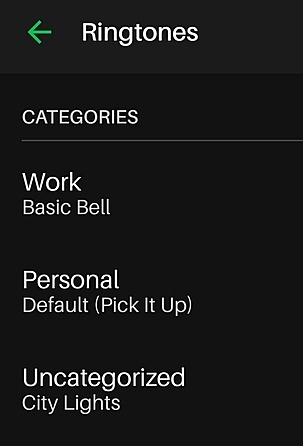
Items to note:
- If you have a ringtone saved to an individual contact, that specific ringtone takes precedence over the ringtone saved for that specific category.
- If no Dispatch ringtone is set, the chosen ringtone from the Android OS Settings will be played (and noted as “default” ringtone) in settings.
If you have further questions or need assistance, please contact support.
Comments
0 comments
Please sign in to leave a comment.