
With app version 1.13, Dispatch can automatically sort your uncategorized communication into work or personal categories, to save you time from having to do so manually.
Here's how:
- Update Dispatch to app version 1.13
- Once Dispatch is opened, a pop-up 'Let's get you organized' will be displayed
- Click 'Continue' to proceed with auto-categorization
- The communication will then begin to categorize (this may take a few minutes depending on the number of existing conversations)
Important: If you notice that the categorization process is ongoing indefinitely, you may need to force close and reopen the app to resume categorization.
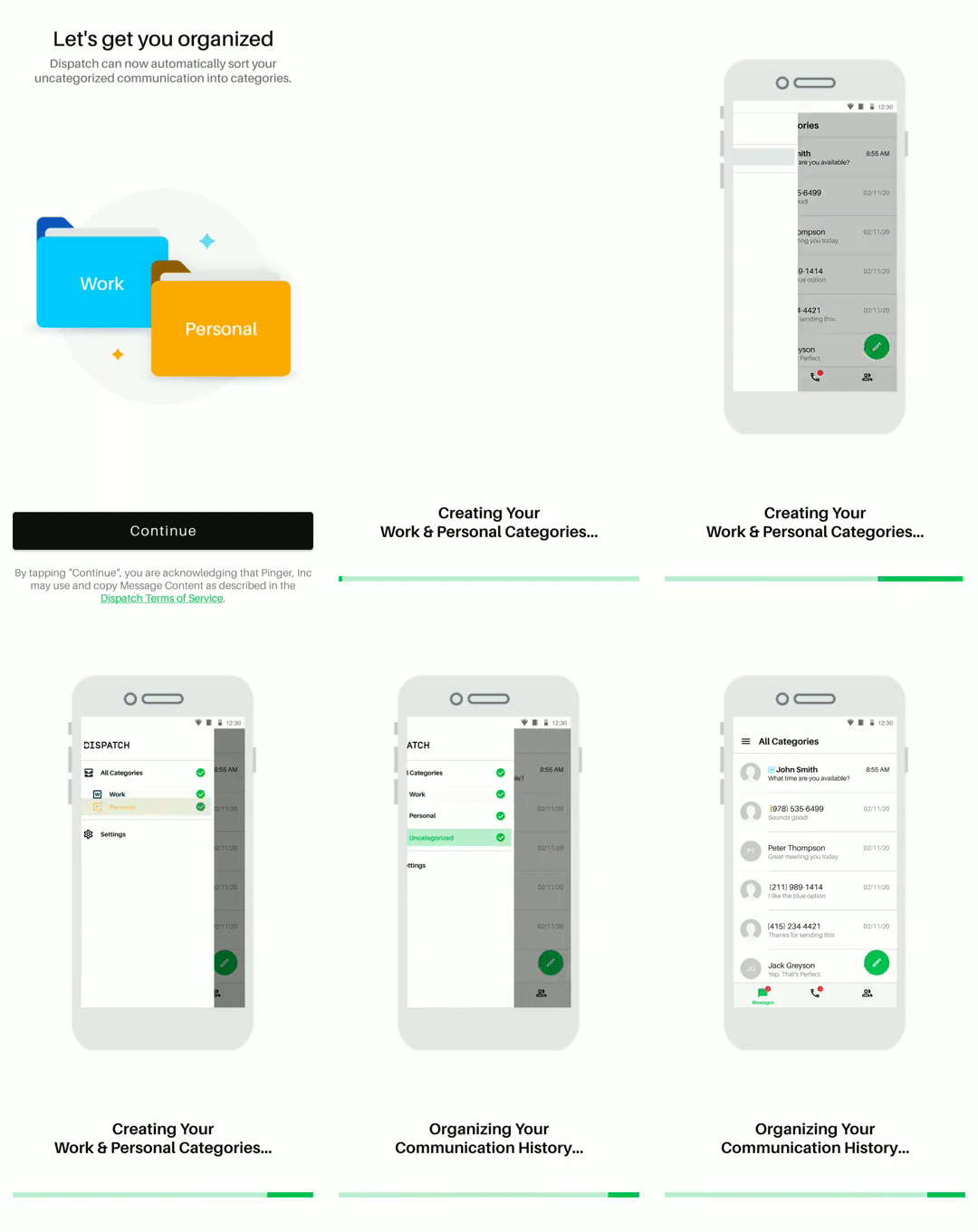
Note: Some contacts may remain uncategorized after the process has completed, which indicates there was not enough information to properly categorize them at the time.
Please note:
- If a contact was incorrectly categorized, they can easily be removed from the category at any time.
- If two different addresses in contacts are assigned to two different categories, then the contact will be tagged as two categories.
- The app may be used while the auto-categorization is in progress (categorization will continue in the background.)
Current Limitations:
- This feature is only able to categorize your existing communication at this time, not incoming new communication.
- There's no option to cancel the auto-categorization once in progress
- AutoCategorization is currently a required feature for Dispatch app to work properly.
Comments
0 comments
Please sign in to leave a comment.